Power Apps「データ アクセス」中最初就存在的 Role 有哪些?
Copyright Notice: This article is an original work licensed under the CC 4.0 BY-NC-ND license.
If you wish to repost this article, please include the original source link and this copyright notice.
Source link: https://v2know.com/article/1355
在 Power Apps 將 Canvas App 分享給其他使用者時,如果 App 使用了 Dataverse,分享畫面中通常會看到「データ アクセス(Data access)」欄位。
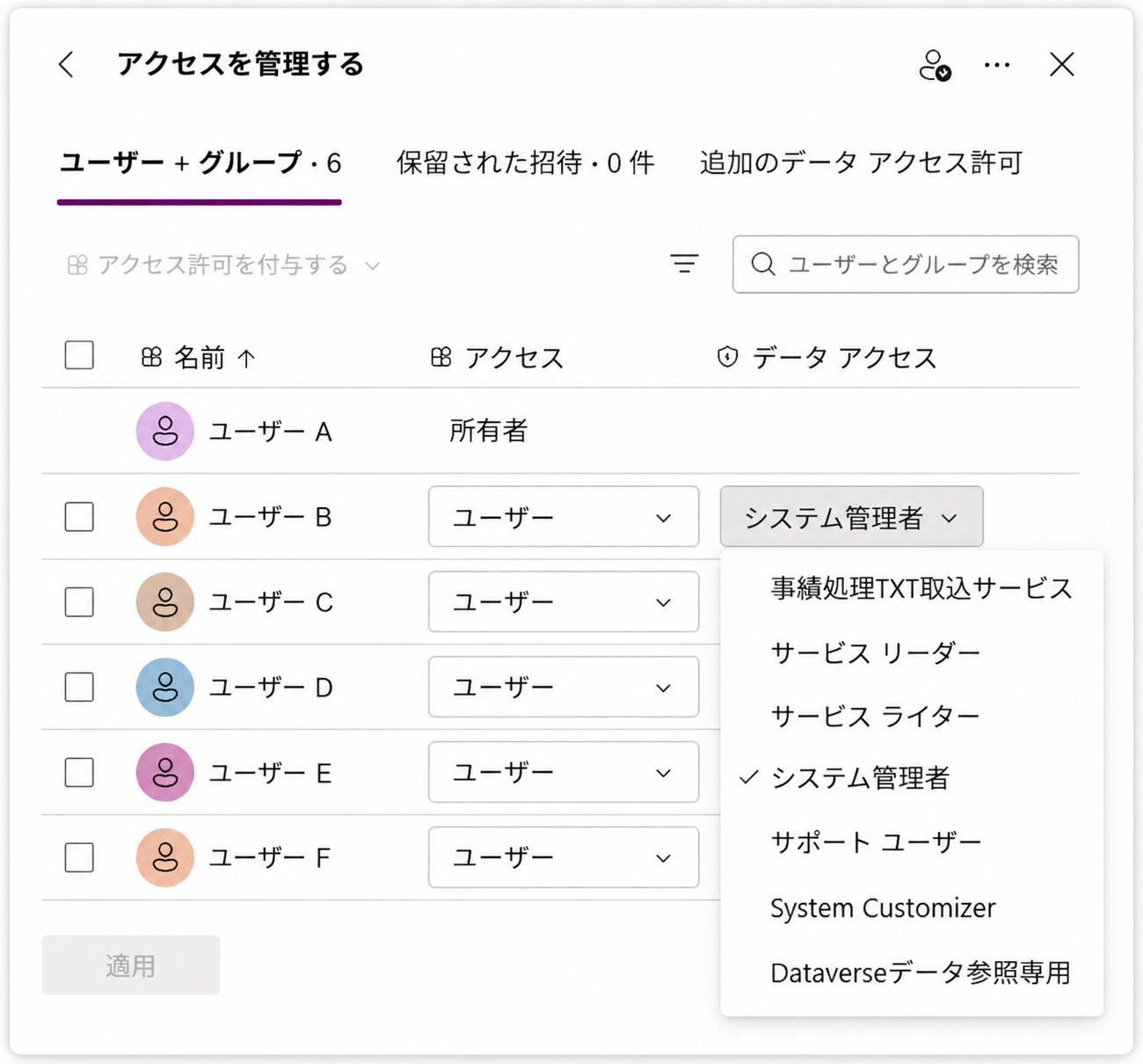
這裡列出的其實就是 Dataverse Security Role(セキュリティ ロール)。
Dataverse 預設的 Security Role
根據 Microsoft 官方文件,具有 Dataverse Database 的環境,預先定義的 Security Role 包括:
-
アプリ オープナー(App Opener)
-
Basic ユーザー
-
代理人(Delegate)
-
Dynamics 365 管理者
-
環境作成者(Environment Maker)
-
グローバル管理者
-
グローバル リーダー
-
Office コラボレーター
-
Power Platform 管理者
-
削除されたサービス
-
サービス リーダー
-
サービス ライター
-
サポート ユーザー
-
システム管理者
-
System Customizer/システムのカスタム担当者
-
Web サイト アプリ所有者
-
Web サイト所有者
例如 Power Apps 的「データ アクセス」下拉框中常見的:
サービス リーダー
サービス ライター
システム管理者
サポート ユーザー
System Customizer
這些都不是自己建立的 Role,而是 Microsoft 預先準備的 Security Role。
為什麼還會看到其他 Role?
實際環境中的清單可能比上述更多。
例如:
事績処理TXT取込サービス
Dataverseデータ参照専用
XXXシステム利用者
這類帶有業務名稱或自行定義名稱的 Role,通常屬於:
-
管理者手動建立的 Security Role
-
Solution 導入的 Security Role
-
Power Platform/Dynamics 365 元件安裝時追加的 Role
因此,「出現在データ アクセス裡」不等於「Microsoft 預設 Role」。
另外,Microsoft 也說明,實際可用的預定義 Role 會根據環境種類以及安裝了哪些應用程式/Power Platform 元件而有所不同。
總結
Power Apps 的「データ アクセス」本質上是在為使用者分配 Dataverse Security Role。
其中既可能包含 Microsoft 原生的:
システム管理者、サービス リーダー、サービス ライター、サポート ユーザー、System Customizer 等
也可能混入後來由專案、Solution 或管理者自己建立的 Role。
所以在整理環境權限時,最好先區分:
「Microsoft 預設 Role」和「專案自行追加的 Role」
不要看到下拉框裡存在某個 Role,就認為它一定是 Dataverse 初始設定的一部分。
This article was last edited at